Here is a short, engaging, and human-written blog post tailored for your image editing tutorial.
How to Create the Ultimate Cartoon Style Tom & Jerry Photo
Remember waking up early on Saturday mornings, grabbing a bowl of cereal, and watching Tom and Jerry completely wreck a house? That nostalgic magic never really goes away. But what if you could step right into the screen and join them?
Thanks to modern AI image generators and editing tools, you can easily insert yourself into the classic cartoon world. Whether you want a cool new profile picture or a fun graphic for your socials, this quick guide and prompt breakdown will show you exactly how to do it.
The Secret Sauce: The AI Prompt
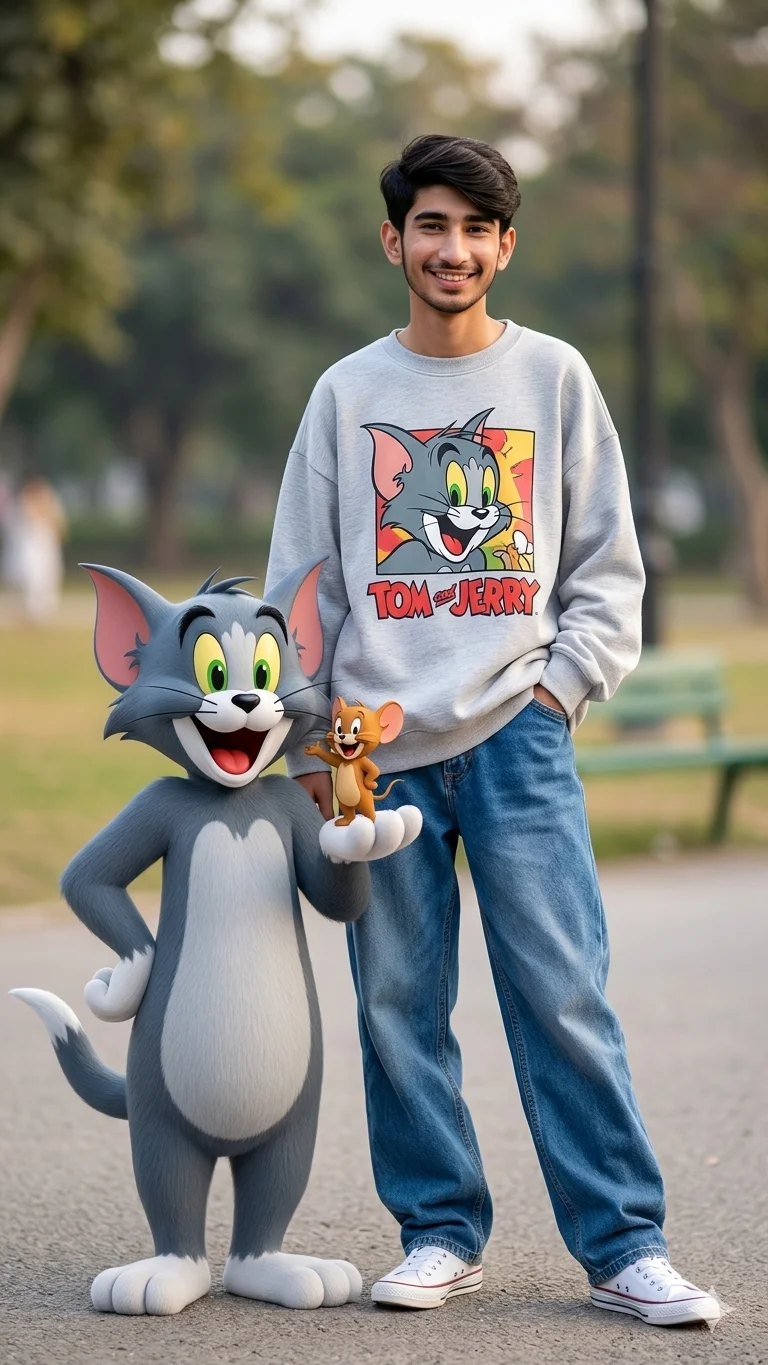
To get this exact look, you need a prompt that balances realistic human features with the iconic, clean-lined 3D cartoon style of modern animation.
Here is the exact framework used to create these images:
Prompt:
Use the uploaded photo as the ONLY face reference and preserve the person’s identity with 100% face match, exact facial structure, jawline, skin tone, hairstyle, beard details, eyes, nose, lips, expression, and overall likeness. Do NOT change or recreate the face. Maintain perfect identity consistency from the reference image.
A cheerful person with small wavy black hair, expressive eyes, warm smile, and adorable face. Standing confidently in a casual stylish pose wearing a cozy light grey sweater with a colorful Tom cat print, oversized baggy blue jeans, and white Converse sneakers. Beside the person stands a life-size anthropomorphic Tom cat from Tom and Jerry with soft grey fur, white belly, large green eyes, pink inner ears, and a playful grin. Tiny Jerry mouse sits happily on Tom’s
other arm looking excited.
Ultra realistic photography, full body shot, natural lighting, highly detailed skin texture, realistic fabric details, shallow depth of field, professional DSLR quality, cinem

Prompt :
Use the uploaded photo as the ONLY face reference and preserve the girl’s identity with 100% face match, exact facial structure, jawline, skin tone, hairstyle, eyes, nose, lips, expression, and overall likeness. Do NOT change or recreate the face. Maintain perfect identity consistency from the reference image.
A cheerful young girl with soft wavy black hair, expressive eyes, glowing skin, warm smile, and adorable face. Standing confidently in a casual stylish pose wearing a cozy light grey oversized sweater with a colorful Tom cat print, trendy oversized baggy blue jeans, and white Converse sneakers. Beside her stands a life-size anthropomorphic Tom cat from Tom and Jerry with soft grey fur, white belly, large green eyes, pink inner ears, and a playful grin. Tiny Jerry mouse sits happily on Tom’s other arm looking excited and cute.
Ultra realistic photography, full body shot, natural lighting, highly detailed skin texture, realistic fabric folds, cinematic shallow depth of field, professional DSLR quality, soft bokeh background, realistic shadows, vibrant colors, cute wholesome vibe, high detail, fashion editorial style, realistic proportions, cinematic composition, 8K ultra detailed.
3 Tips to Perfect the Edit
If you are using apps like Photoshop, PicsArt, or Lightroom to tweak your final generation, keep these three tricks in mind:
-
Match the Lighting: Look at where the shadows fall on your cartoon buddies. Ensure the highlights on your clothes match the direction of the light hitting Tom and Jerry.
-
Add an Outline Effect: To make your photo blend seamlessly with the cartoon characters, use a slight “posterize” or “oil paint” filter on yourself, or add a subtle white sticker outline to give it a comic-book pop.
-
Color Match: Boost the saturation slightly. Cartoons thrive on vibrant primary colors—make sure your blue jeans and the red text on your shirt match the bold hues of Tom and Jerry.
Ready to Try It?
Drop this prompt into your favorite AI art generator (like Bing Image Creator, Midjourney, or Gemini) and see what you come up with!
Which classic cartoon character are you hanging out with next? Let me know in the comments below!

📢 Join Our WhatsApp Channel
Get daily AI photo editing prompts, tools, and tips directly on your phone.
Join Now on WhatsApp 🚀