Introduction
Most AI-generated travel photos still look overly polished. The lighting feels fake, the skin looks plastic, and the final image often resembles a movie poster more than a real memory. After experimenting with different prompt styles inside gemini.google.com, I started focusing on something completely different: realism that feels imperfect.
Instead of cinematic perfection, the goal was to recreate the kind of photos people actually post on Instagram stories or keep buried in their camera roll — handheld iPhone shots, low-light haze, soft motion blur, uneven framing, natural fabric folds, and lighting that feels accidental rather than directed.
For this aesthetic, the key was writing prompts that force the AI to avoid the usual “AI beauty” look. Every detail matters: the camera type, lighting conditions, clothing texture, slight shake, HDR imperfections, and even the emotional vibe of the moment.
Below are three prompts I used to create ultra-realistic travel aesthetics using Gemini.
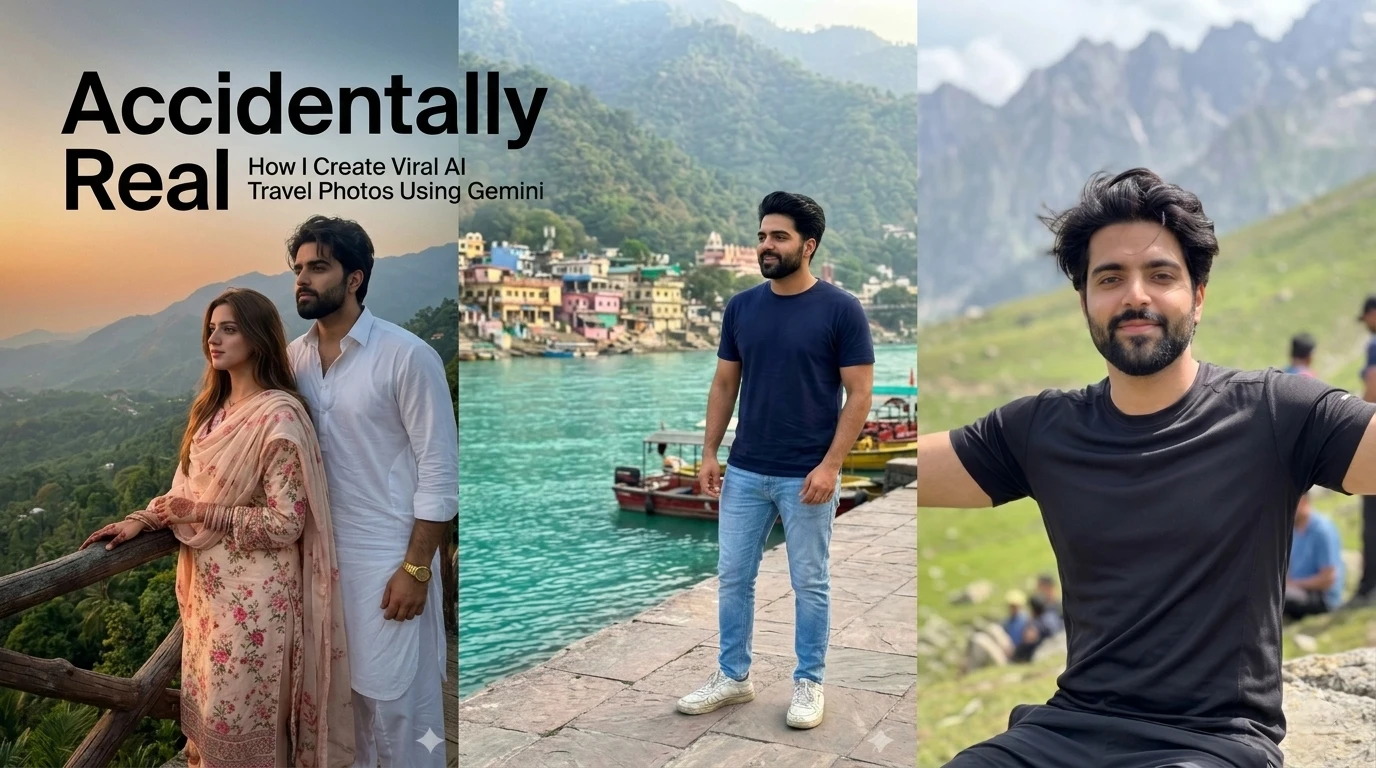
Scene 1: Mountain Viewpoint Couple Aesthetic
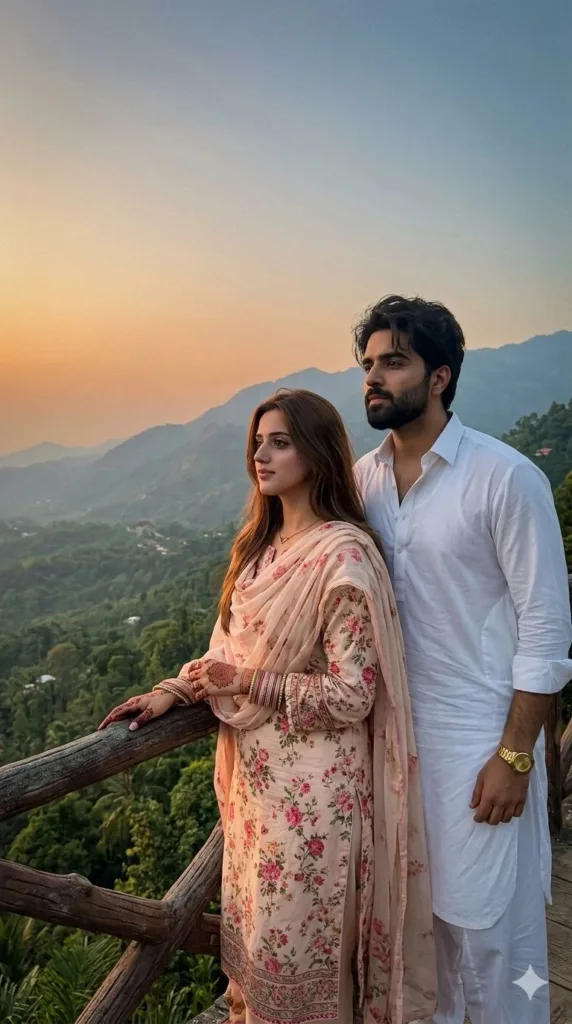
Prompt Used:
Ultra-realistic candid iPhone 15 Pro dusk travel snapshot of a stylish young couple beside a wooden mountain viewpoint railing overlooking lush tropical valleys, accidental Instagram-style luxury travel memory with handheld vertical 9:16 framing, slight shake, low-light lo-fi dusk mood, soft sunset haze and imperfect smartphone realism; male wearing white shalwar kameez with open top buttons and gold watch, no glasses, female (Jannat Mirza) wearing cream-pink floral lawn suit with flowing dupatta, mehndi and Kashmiri bangles, both naturally looking left toward the scenery, realistic skin texture, fabric folds, subtle grain, atmospheric mountain depth, muted orange-blue grading, socially believable candid vibe — no CGI, beauty filter, hyper-sharp DSLR look, fake cinematic grading or AI overprocessing.
Why This Prompt Works
This prompt avoids the typical over-detailed AI look by leaning into smartphone imperfections. The “slight shake,” “low-light dusk mood,” and “soft sunset haze” help break the artificial sharpness that most generators create automatically.
The clothing details also matter more than people think. Traditional outfits with realistic folds and movement add authenticity because AI usually struggles with fabric behaving naturally. Adding terms like socially believable and accidental Instagram-style memory pushes the image away from a commercial photoshoot vibe.
Scene 2: Riverside Town Travel Snapshot
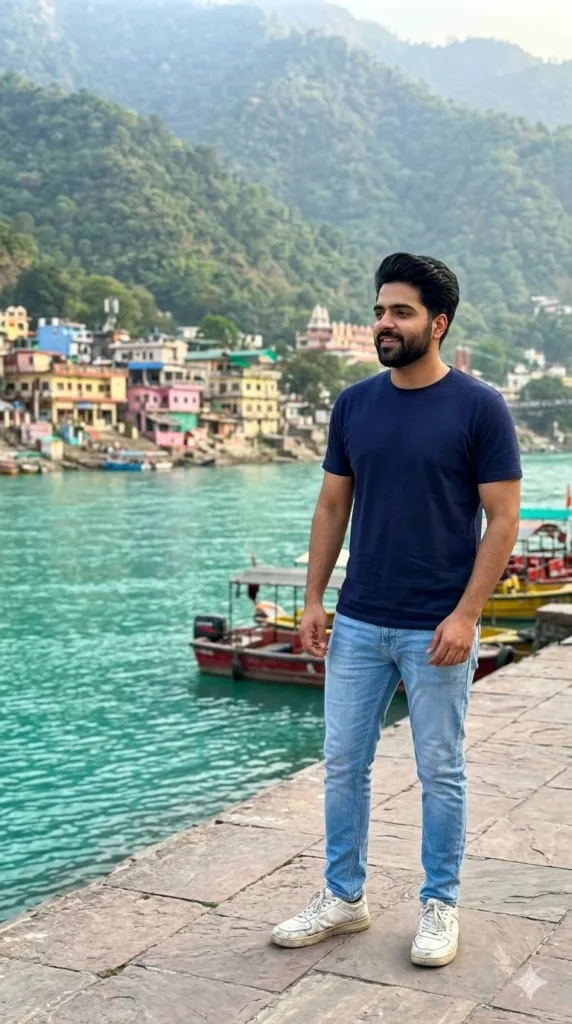
Prompt Used:
Ultra-realistic candid iPhone travel snapshot of a stylish man in navy blue t-shirt, light blue slim-fit jeans and worn white sneakers, no glasses standing casually on a stone walkway overlooking a vibrant turquoise riverside town with boats and lush mountains, handheld vertical 9:16 iPhone rear-camera aesthetic with slight shake, soft HDR imperfections, natural daylight, atmospheric haze, realistic skin and fabric texture, accidental Instagram-style vacation memory, socially believable and imperfect — no CGI, beauty filter, fake cinematic grading, hyper-sharp DSLR look or AI overprocessing.
Why This Prompt Works
One of the biggest mistakes in AI travel photography is trying to make everything look expensive and cinematic. Real vacation photos usually have uneven lighting, slightly awkward framing, and ordinary body posture.
This prompt intentionally keeps the styling grounded. Worn sneakers, casual stance, soft daylight haze, and smartphone HDR imperfections make the final image feel human. The turquoise riverside background adds visual contrast without making the scene look unrealistic.
Scene 3: Mountain Hiking Portrait
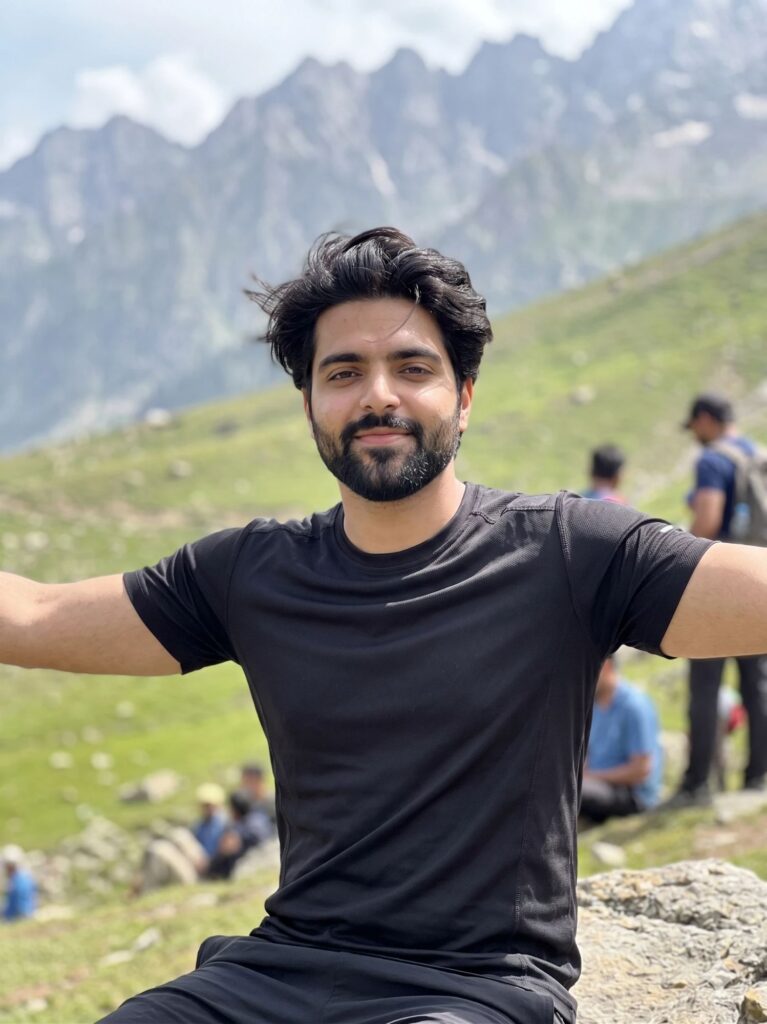
Prompt Used:
Ultra-realistic candid iPhone mountain travel snapshot of the same young athletic man from the reference image sitting casually on a large rock along a lush green mountain slope with arms spread wide, wearing a fitted black hiking t-shirt with realistic wrinkles and outdoor texture, handheld vertical 9:16 rear-camera aesthetic with slight shake, soft HDR imperfections, natural daylight haze, realistic skin pores, beard and messy wind-blown hair, atmospheric mountain depth and accidental Instagram-style realism, socially believable and imperfect — no CGI, beauty filter, hyper-sharp DSLR look, fake cinematic lighting or AI overprocessing.
Why This Prompt Works
This scene works because it focuses heavily on environmental realism instead of beauty enhancement. Wind-blown hair, natural beard texture, and realistic wrinkles in clothing create small imperfections that make the image believable.
The phrase accidental Instagram-style realism is especially powerful because it tells Gemini to prioritize authenticity over polished composition. Combined with handheld framing and atmospheric depth, the result feels closer to a real hiking memory captured on an iPhone.
My Process for Creating Realistic AI Travel Aesthetics in Gemini
When writing prompts like these, I usually follow a simple structure:
1: Start with the camera style first
Mention iPhone rear-camera, handheld framing, vertical 9:16 ratio, slight shake, or HDR imperfections.
2: Describe the environment naturally
Instead of fantasy scenery, use believable locations with atmospheric haze, uneven lighting, or muted colors.
3: Add realistic clothing and texture details
Fabric folds, wrinkles, worn shoes, messy hair, and natural skin texture help remove the fake AI look.
4: Tell the AI what to avoid
Negative descriptions are important. Terms like “no CGI,” “no beauty filter,” and “no hyper-sharp DSLR look” help Gemini avoid overprocessing.
5: Focus on emotional realism
The best AI travel images feel like memories, not advertisements.
Conclusion
The difference between a realistic AI image and a fake-looking one usually comes down to restraint. Instead of chasing cinematic perfection, these prompts focus on believable lighting, natural imperfections, and everyday travel energy.
That’s what makes the final images feel closer to something captured during a real trip rather than generated by AI.
If you’re experimenting with travel aesthetics inside gemini.google.com, try focusing less on “ultra cinematic” keywords and more on human imperfections. Ironically, that’s usually what makes AI images feel the most real.
Try Google Gemini Here:
This blog post and AI prompts were created by Shahbaz Ahmad.
Follow me on TikTok @Dudefrompak for more ready-to-use prompts.

📢 Join Our WhatsApp Channel
Get daily AI photo editing prompts, tools, and tips directly on your phone.
Join Now on WhatsApp 🚀