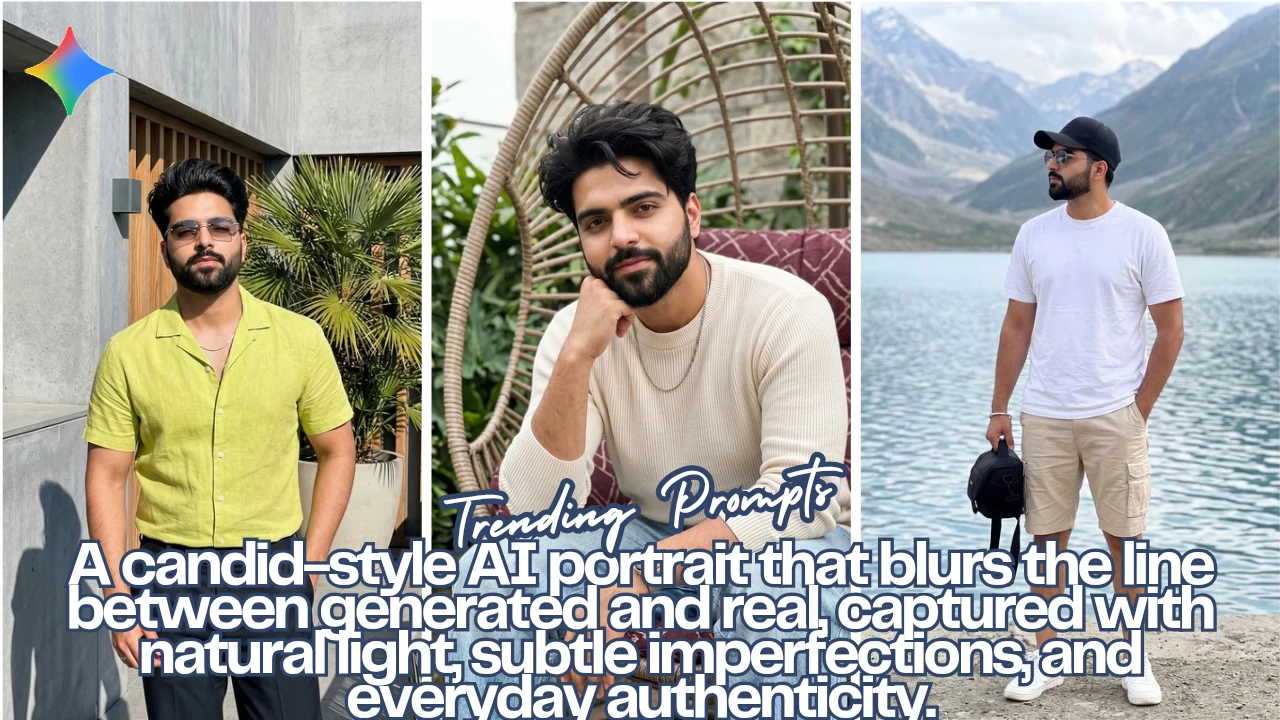
There’s a big difference between AI-generated and believable. Most images look polished but not lived-in. What I’ve been experimenting with lately is pushing Google Gemini to create images that feel like they were casually shot on a phone… slightly imperfect, a bit unbalanced, but still visually strong.
The idea isn’t perfection. It’s authenticity.
Below are three prompts I tested around a similar subject, each built to simulate a different kind of real-life moment from a sharp sunlit terrace shot to a softer, more intimate lifestyle frame, and finally a wide, documentary-style outdoor capture.
Image 1
Prompt Used:
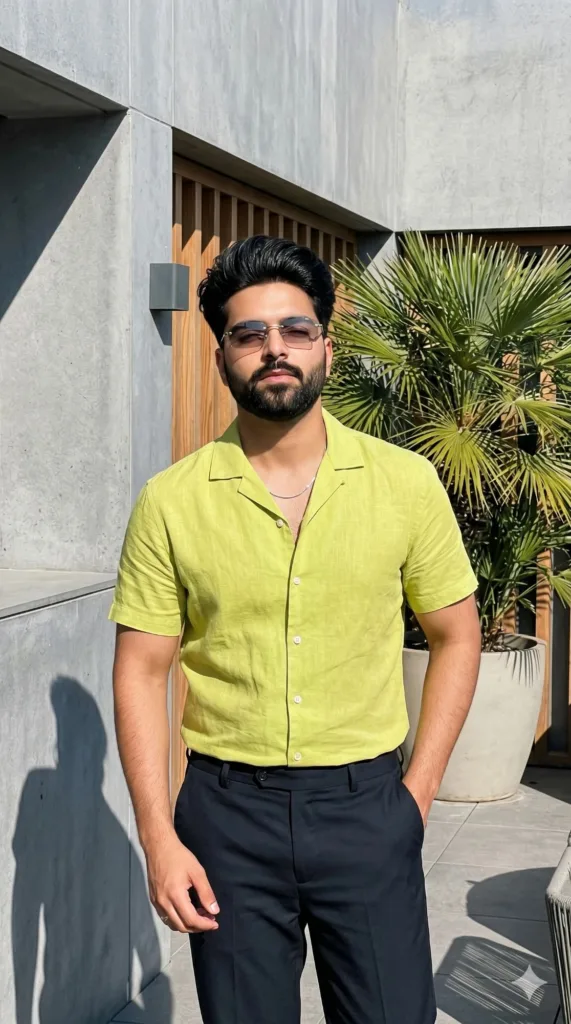
Ultra-realistic unintentional candid iPhone snapshot of a young man, 100% face unchanged from reference, no alterations. Standing on a modern terrace/courtyard, full to mid-thigh framing, body facing camera, head slightly tilted, eyes relaxed or half-closed, calm confident expression.
Short thick hair, natural shine in sunlight, clean youthful look. Athletic build.
Outfit: fitted lime green Hawaiian shirt made of linen (short-sleeve top with subtle texture and tailored trousers or relaxed fit pants), minimal luxury styling, thin white chain/necklace, thin rimless rectangular tinted sunglasses.
Pose: arms bent casually, hands near waist adjusting shirt or pockets, natural stance, not fully posing.
Environment: modern city terrace with grey walls, wooden slats, large potted palm tree, clean architectural lines.
Lighting: strong direct sunlight from above/side, harsh defined shadows, bright highlights on hair and outfit, slight overexposure.
Camera: handheld iPhone, slight tilt, imperfect framing, minor motion blur, visible grain, uneven exposure, raw unedited look, spontaneous but stylish and premium.
Color: vibrant summer tones, bright lime green pop, natural phone color processing.
–ar 9:16 –style raw –v 6 –no blur –no distortion –no CGI –no plastic skin
Image 2
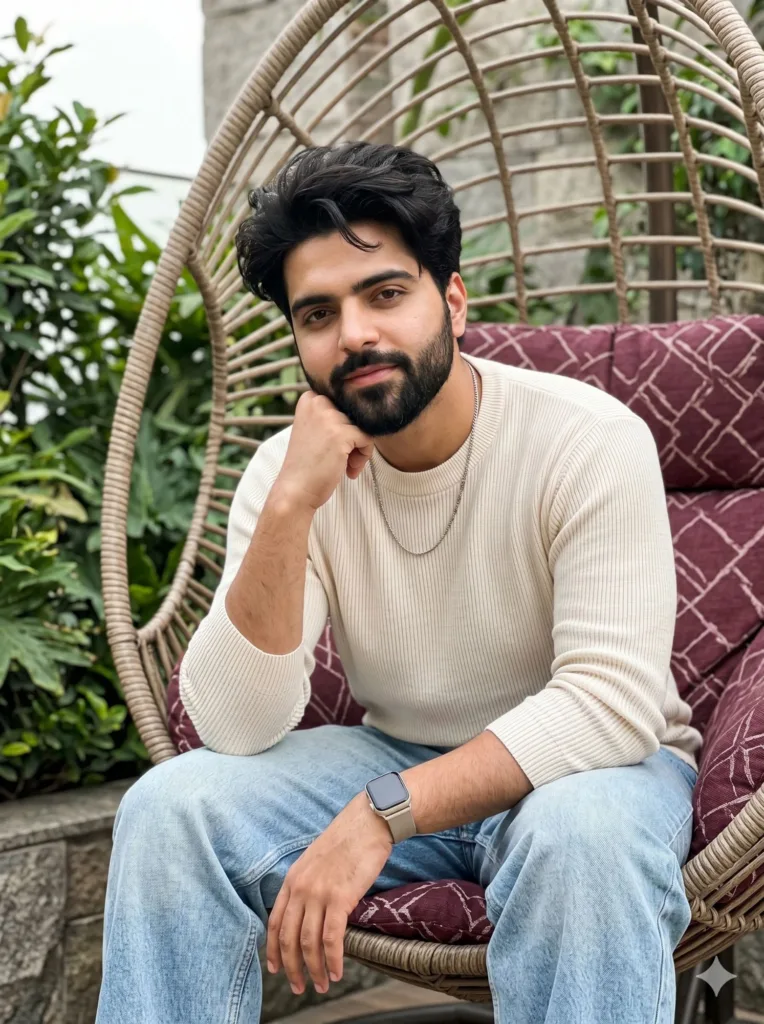
Prompt Used:
Ultra-realistic unintentional candid iPhone snapshot of a young man, 100% face unchanged from reference, no alterations. A relaxed lifestyle moment captured naturally on a terrace/garden setting.
Pose & expression: sitting casually in a woven hanging cocoon chair, leaning slightly forward. One elbow resting on knee while hand loosely supports his chin, the other hand relaxed on thigh. Soft, calm expression with a subtle confident half-smile, direct but effortless eye contact, not overly posed. No glasses.
Hair: thick, natural hair with soft texture, slightly tousled, catching soft daylight highlights.
Outfit: beige/cream ribbed knit sweater or fitted long-sleeve top, paired with loose light-wash jeans. Minimal luxury styling. Accessories include a smartwatch (Apple Watch style) with a soft neutral-toned strap and a thin subtle chain necklace.
Environment: modern terrace or garden corner with a woven hanging chair, a deep burgundy cushion with abstract pattern, surrounded by soft green foliage and hints of stone/concrete textures in the background.
Lighting: soft natural daylight (light shade or cloudy sky), evenly diffused lighting across face and body, no harsh shadows, gentle highlights on skin and hair.
Camera & realism: shot on iPhone, eye-level front-facing composition, slight handheld imperfection, natural framing, subtle depth of field with background softly blurred (bokeh), ultra-detailed skin texture with pores, natural imperfections, no over-smoothing.
Color & mood: muted natural tones (beige, green, grey) with a rich burgundy accent, warm calm atmosphere, slightly romantic but grounded in realism.
Quality: 8K ultra-clear but still retaining authentic smartphone processing, slight grain/noise for realism, unedited candid feel while maintaining a stylish, premium aesthetic.
–ar 3:4 –style raw –v 6 –no CGI –no plastic skin –no overprocessing
Image 3

Prompt Used:
Ultra-realistic iPhone 15 Pro Max candid snapshot, 0.5x ultra-wide lens, slight handheld shake, natural barrel distortion and edge stretch, authentic iPhone HDR processing; young man (strict face match from reference, no changes) standing casually by a lakeside stone wall. Full-body framing from a slightly low angle, imperfect composition as if shot by a friend. He wears a plain white t-shirt, beige cargo shorts, white sneakers, black cap, and sunglasses with subtle reflections. One hand naturally in pocket, the other loosely holding a black camera bag, posture relaxed with body slightly angled and head turned toward the lake, face partially visible.
Environment: scenic blue lake with distant mountains and trees, bright sky slightly overexposed in highlights, natural depth and atmospheric haze.
Lighting: real daylight with soft shadows, slight exposure imbalance between sky and subject, mild highlight clipping typical of iPhone photos.
Camera feel: unposed documentary moment, slight tilt, minor motion blur, realistic depth of field (not DSLR), subtle grain, natural colors, no over-sharpening, true smartphone realism
–ar 3:4 –style raw –v 6 –0.
Final Thoughts
What stands out across all three is that realism doesn’t come from adding detail it comes from removing control. The slight tilt, uneven exposure, minor blur… those are the things that convince your brain the image wasn’t manufactured.
Most people over-correct AI images into perfection. That’s usually where they start looking fake.
If anything, these prompts work because they lean into imperfection while still keeping a clear visual direction. It’s a balance structured enough to guide the model, loose enough to let it feel real.
If you’re experimenting with Gemini, try tweaking just one variable at a time lighting, lens, or pose and watch how much the final image shifts. That’s where things start getting interesting.
Try Google Gemini Here:
This blog post and AI prompts were created by Shahbaz Ahmad.
Follow me on TikTok @Dudefrompak for more ready-to-use prompts.

📢 Join Our WhatsApp Channel
Get daily AI photo editing prompts, tools, and tips directly on your phone.
Join Now on WhatsApp 🚀