A Realistic iPhone Aesthetic Guide for Cinematic South Asian AI Images
Introduction
Most AI-generated portraits still look overly polished. The skin is too smooth, the lighting feels artificial, and the final image often ends up looking more like a video game render than an actual phone photo.
I wanted something different.
Instead of creating perfect studio-style AI portraits, I experimented with a more natural approach — accidental iPhone selfies, imperfect motion blur, messy hair, realistic lighting, and authentic South Asian fashion. The goal was simple: make the images feel like they were captured during a real road trip instead of generated by AI.
Using Gemini AI, I tested a cinematic “Instagram story” style with luxury SUV interiors, golden-hour lighting, desi outfits, and an unexpected detail that completely changed the vibe of the images — a goat wearing sunglasses.
The results looked surprisingly believable. Each image carried a casual energy that made it feel spontaneous rather than staged.
Below are the exact prompts, the image concepts, and the workflow I used to create the aesthetic.
Image 1: The Solo Male Road Trip Aesthetic
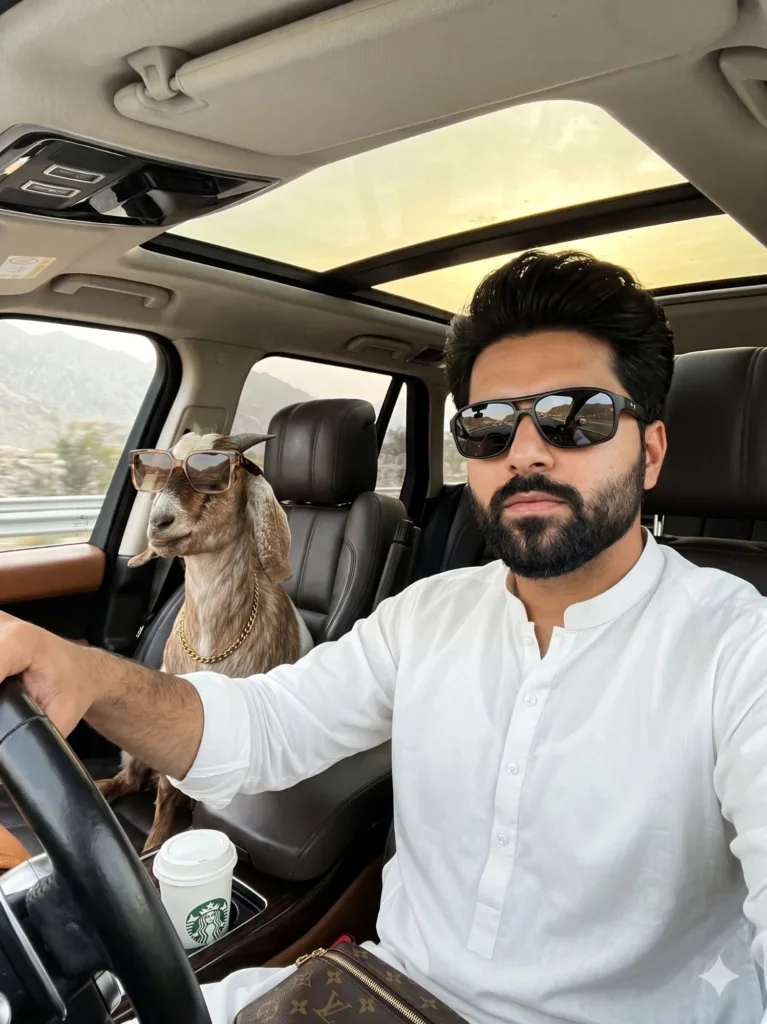
Prompt used:
Ultra-realistic accidental iPhone front-camera selfie inside a moving luxury SUV during a scenic road trip, STRICT IDENTITY LOCK preserving the exact face of the South Asian man with natural skin texture and beard detail, wearing a white shalwar kameez and dark sunglasses while driving, with a stylish sunglasses-wearing goat in the passenger seat, candid Instagram-story aesthetic, cinematic golden-hour lighting, realistic motion blur, luxury interior details, messy hair, and authentic smartphone imperfections — no AI beauty filter, CGI, or fake influencer look.
Why This Prompt Worked
This prompt avoided the typical “AI influencer” appearance by focusing on imperfections instead of perfection. Small details like messy hair, motion blur, and uneven phone-camera lighting helped the image feel more believable.
The white shalwar kameez also grounded the aesthetic in a familiar South Asian environment instead of making it feel overly westernized or artificial.
The goat in sunglasses added personality without turning the image into a meme. It stayed cinematic while still feeling playful.
Image 2: The Female Luxury SUV Selfie
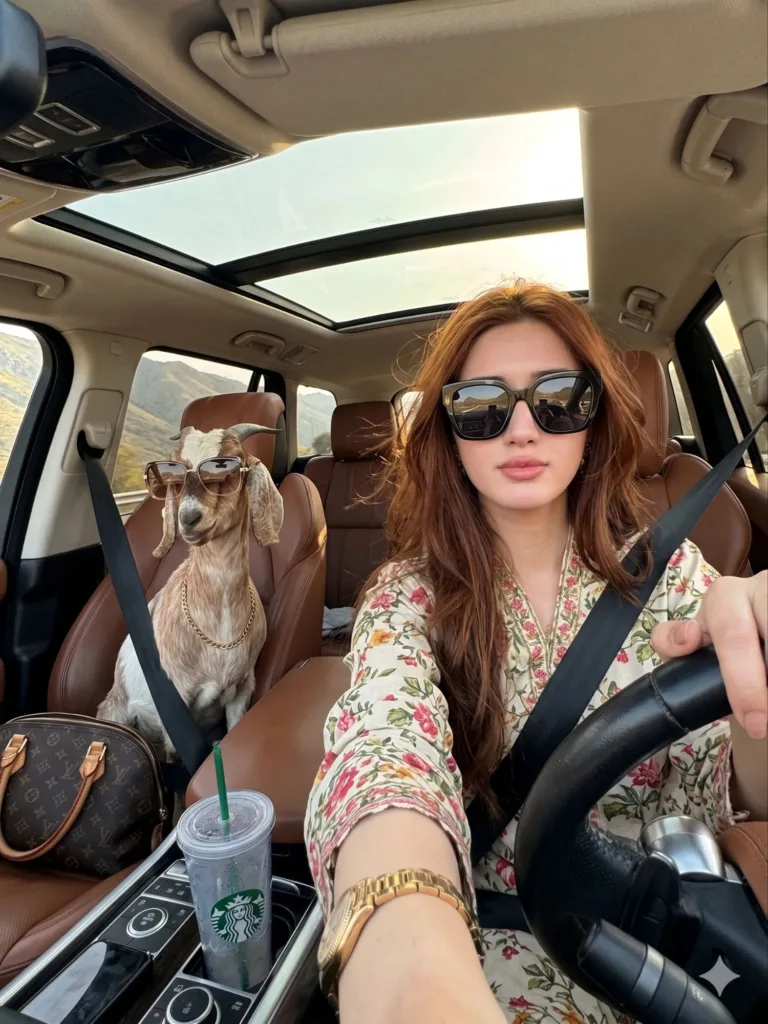
Prompt used:
Ultra-realistic accidental iPhone front-camera selfie inside a moving luxury SUV during a scenic road trip, STRICT IDENTITY LOCK preserving the exact face of the South Asian woman with natural skin texture and realistic facial details, wearing a floral Pakistani lawn outfit and oversized black sunglasses while driving, with a stylish sunglasses-wearing goat in the passenger seat, candid Instagram-story aesthetic, cinematic golden-hour lighting, glossy dark red hair with loose strands, luxury interior details, realistic motion blur, and authentic smartphone imperfections, no AI beauty filter, CGI, or fake influencer look.
Why This Prompt Worked
The strongest part of this image was the balance between glamour and realism.
Instead of asking Gemini for “perfect beauty,” the prompt focused on believable details like loose hair strands, natural skin texture, and imperfect lighting. Those small elements made the final image feel closer to an actual front-camera selfie.
The floral Pakistani lawn outfit also added softness to the scene and matched naturally with the warm golden-hour lighting.
Image 3: The Couple Version
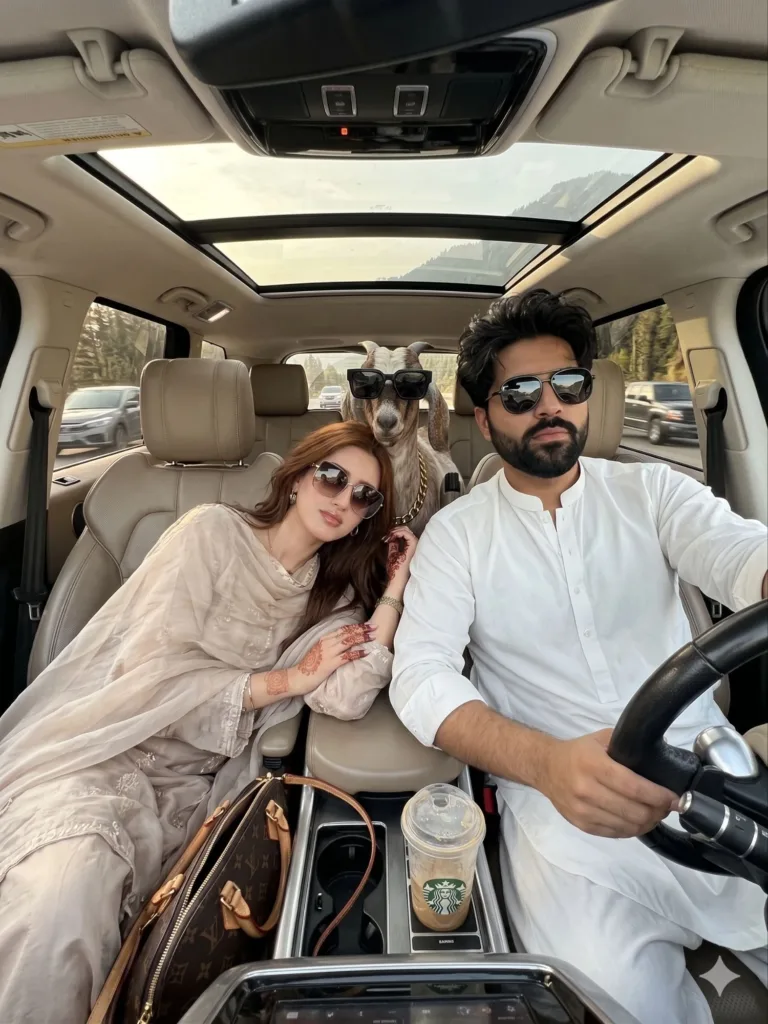
Prompt used:
Ultra-realistic accidental iPhone front-camera couple selfie inside a moving luxury SUV during a scenic road trip, STRICT IDENTITY LOCK preserving the exact faces of both the South Asian man and woman with natural skin texture and authentic facial details, the man driving in a white shalwar kameez and dark sunglasses while the woman leans naturally beside him in an elegant Pakistani outfit, with a stylish sunglasses-wearing goat in the back seat, candid Instagram-story aesthetic, cinematic golden-hour lighting, realistic motion blur, luxury interior details, authentic couple chemistry, and natural smartphone imperfections, no AI beauty filter, CGI, or fake influencer look.
Why This Prompt Worked
This version felt the most cinematic because it introduced interaction and chemistry between two people instead of focusing on a single portrait.
The phrase “leans naturally beside him” helped Gemini avoid stiff posing. Combined with realistic motion blur and smartphone imperfections, the image looked closer to a genuine road trip memory.
Keeping the goat in the back seat instead of the front also helped the composition feel more balanced and believable.
The Gemini AI Workflow I Used
Creating realistic AI selfies is less about adding more detail and more about controlling the type of realism you want.
Here’s the process I followed while generating these images:
1. Start With an iPhone Camera Perspective
Instead of describing the image like a professional photoshoot, I framed everything as a front-camera iPhone selfie.
This immediately pushed Gemini toward more casual compositions and natural imperfections.
2. Remove the “AI Beauty Filter” Look
Most AI portraits fail because they become too polished. To avoid that, I explicitly told Gemini what not to do.
3. Add Motion and Imperfection
Perfectly sharp AI images often feel fake. Motion blur and uneven lighting create realism because real phone photos are rarely perfect.
Final Thoughts
What made these images feel believable wasn’t the luxury SUV or cinematic lighting. It was the imperfections.
The slightly messy hair, casual framing, natural lighting, and smartphone-camera feel created the illusion of a real memory instead of a heavily generated AI image.
That’s the direction AI aesthetics are slowly moving toward now — less perfection, more realism.
And strangely enough, the goat wearing sunglasses somehow made the entire concept feel even more human.
Try Google Gemini here:
This blog post and AI prompts were created by Shahbaz Ahmad.
Follow me on TikTok @Dudefrompak for more ready-to-use prompts.

📢 Join Our WhatsApp Channel
Get daily AI photo editing prompts, tools, and tips directly on your phone.
Join Now on WhatsApp 🚀