Happy New Year AI Photo Editing Prompt: Create a Cinematic 2026 Photo in One Click
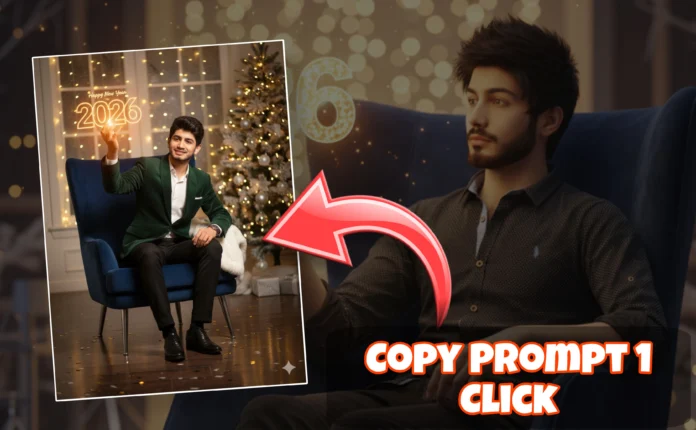
Happy New Year AI photo editing is becoming a massive trend on Instagram, Facebook, and WhatsApp as people prepare premium photos to welcome the new year. Instead of using simple text wishes, creators are now generating cinematic New Year portraits with glowing lights, bold year numbers, and a professional photoshoot vibe — just like the image above.
In this article, you’ll learn what the Happy New Year AI photo trend is, why it’s going viral, and how you can create your own stunning 2026 New Year AI image using a copy-paste prompt.
What Is Happy New Year AI Photo Editing?
Happy New Year AI photo editing uses artificial intelligence to transform normal photos into celebration-style New Year images. These images often include glowing year numbers, cinematic lighting, confetti effects, and a premium background.
- Professional lighting and shadows
- Glowing year numbers (2026)
- Confetti and festive particles
- Sharp facial details
- Studio-quality cinematic look
This trend is widely used for Instagram profile photos, WhatsApp DP, Facebook posts, and YouTube thumbnails.
Why Happy New Year AI Photos Are Trending
1. Unique New Year Wishes
AI photos look more premium and memorable than simple text messages.
2. High Social Media Engagement
Festive AI images receive higher likes, shares, and comments.
3. No Editing Skills Needed
Anyone can generate a professional New Year image using AI tools.
4. Perfect for Personal Branding
Creators use these images to start the year with a strong visual identity.
Best AI Tools for Happy New Year Photo Editing
You can create images like this using the following AI platforms:
Happy New Year 2026 AI Photo Prompt (Copy & Paste)
*PROMPT*🎉🔥
A young man sitting confidently on large glowing 2026 numbers inside a warehouse studio, cinematic lighting, warm golden lights, festive confetti particles, ultra-realistic photography, shallow depth of field, sharp facial details, modern outfit, professional photoshoot style, 8K resolution, New Year celebration vibe

Ultra-realistic cinematic New Year portrait of the same person from the reference image, preserving exact facial structure, skin tone, beard style, eye shape, nose, lips, and jawline. The subject is sitting confidently on large 3D white numbers reading “2026”, one knee raised, relaxed pose, looking directly at the camera.
He is wearing modern black streetwear: a black hoodie with a minimal geometric logo, layered under a black tactical jacket with straps, zippers, metallic details, black cargo pants, and clean white sneakers.
Industrial indoor hall environment with high ceiling, soft overhead lighting, warm bokeh lights in the background, golden confetti floating in the air. “HAPPY NEW YEAR” text visible behind the subject.
Professional cinematic lighting, soft shadows, realistic skin texture, sharp focus on face, shallow depth of field, ultra-realistic, 4K quality, editorial photography style.
Pro Tip: Upload your own photo and use image-to-image mode for the most realistic results.
How to Create a Happy New Year AI Image (Step-by-Step)
- Open an AI image generator like Bing Image Creator or Leonardo AI.
- Upload a clear photo with good lighting.
- Paste the Happy New Year AI prompt above.
- Select Photorealistic or Ultra Quality.
- Generate and download your New Year image.
Best Poses for New Year AI Photos
- Sitting or leaning on year numbers
- Relaxed confident posture
- Facing the camera with neutral expression
- Minimal background distractions
SEO Benefits of Happy New Year AI Images
If you are a content creator or blogger, New Year AI photos can help you:
- Increase social media engagement
- Create eye-catching thumbnails
- Build a premium personal brand
- Avoid copyright issues
Final Thoughts
Happy New Year AI photo editing is the easiest way to welcome 2026 with style. With one prompt and one click, you can generate a cinematic, professional-looking image that stands out on every platform.
Try this AI prompt today and start the New Year with a powerful visual identity.

📢 Join Our WhatsApp Channel
Get daily AI photo editing prompts, tools, and tips directly on your phone.
Join Now on WhatsApp 🚀